

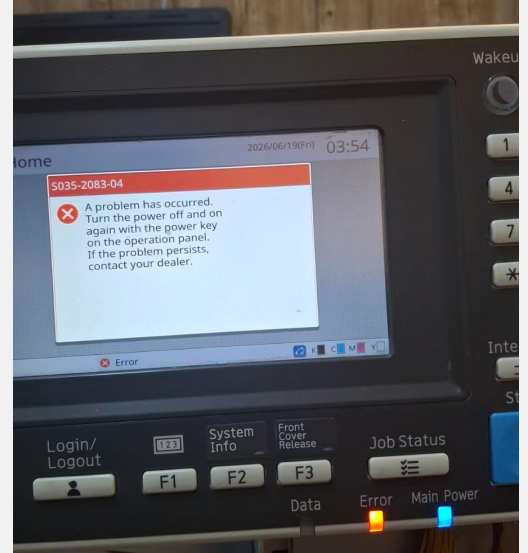
Error S99-2083-04 on a Riso ComColor GD series machine (such as the GD9630, GD9631, or GD7330)indicates an ink supply system or engine communication fault,
specifically pointing to the 4th color channel (Yellow) ink tank level/pressure sensor or ink circulation hardware.
Note: On ComColor GD printers,
S99 is the top-level system error wrapper for underlying
S35 ink supply unit sub-codes (2083-04).
- Perform a Soft Reboot
- Press the [RESET] key on the operation panel.
- If the code remains, press the sub-power [Power] key on the panel to shut down the machine, wait 30 seconds, and turn it back on.
- Perform a Full Power Cycle
- If a soft reboot does not clear the error, turn off the machine using the sub-power key, then switch off the main power switch.
- Unplug the power cord from the wall outlet for at least 1 to 2 minutes to completely discharge the engine control boards, then reconnect and power on. [1]
- Check the Yellow (4th Channel) Ink Cartridge & Slot
- Open the front cover and inspect the Yellow (Y) ink cartridge.
- Ensure the cartridge is not empty, expired, or leaking, and verify that the RFID chip on the cartridge is clean and undamaged.
- Remove and firmly re-seat the Yellow cartridge so the ink needle/port engages properly.
- Inspect Ink Circulation & Hardware (Service Level)
- Air lock or clogged ink line / solenoid valve: Air bubbles or dried ink restricting flow to the pressurized tank.
- Pressurized ink tank sensor (Channel 4): A stuck float or faulty level/pressure sensor failing to detect ink fill within the expected cycle time.
- Ink circulation pump or Engine Control PCB: A weak pump or a loose wiring harness between the ink supply unit and the engine board.
- If the error persists immediately upon startup or during ink filling/circulation, it usually points to a hardware issue in the Yellow ink supply path:
Products
Technical Support
Download
Contact Us
Xiamen Kreyoly Office Supplies Co.,Ltd
Add: Unit 1707, No.64,Pingshan South Road,HaiCang Dist., 361028 Xiamen,China
Tel:+86-592 6896238
Fax:+86-592 6896236
Mob/WhatsApp/Viber: +86 13860165915
E-mail: info@kreyoly.com
https://www.kreyoly.com


Copyright © 2026 XIAMEN KREYOLY OFFICE SUPPLIES CO.,LTD All Rights Reserved. 闽ICP备2023005318号