

Error code S99-0165-01 on a Riso ComColor FW/GD series machine is a software/logic malfunction detected by the RFID tag manager.
This module manages communication and data reading for the ink cartridge RFID chips
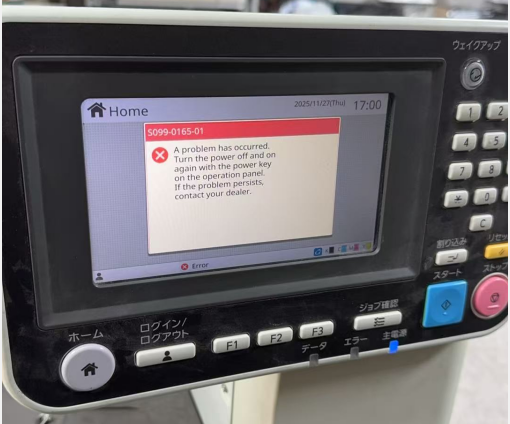
Code Breakdown
S99. Indicates a general system or engine control software error.
0165. Points specifically to an RFID tag manager communication or logic fault.
-01. The sub-code variation indicating a general malfunction detected by the RFID tag management software
Troubleshooting Steps
Perform a soft reboot. Press the [RESET] key on the operation panel. If it does not clear, press the [Sub Power] key on the panel to turn the machine off,
wait 30 seconds, and turn it back on.
2. Perform a full power cycle. Turn off the machine using the panel power key, flip the main power switch off, and unplug the power cord for at least one minute
before restarting.
3. Reseat the ink cartridges. Open the front ink cover, remove all ink cartridges, check that the RFID chips on the cartridges are clean and undamaged, and
reinsert them firmly until they click into place. (If third-party or refilled chips are being used, a faulty or incompatible RFID tag can trigger this loop.)
4. Check RFID reader connections. If the error persists after restarting and reseating the cartridges, inspect the wire harnesses and connectors leading from the
ink cartridge RFID reader/antenna board to the Engine Control PCB for loose contacts.
5. Inspect firmware or control PCB. Persistent S99-0165-01 errors without a faulty cartridge chip usually point to an engine firmware glitch requiring a firmware
update/re-flash or a fault on the Engine Control PCB.
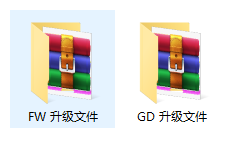
6. Of course, there is also a quick fix: simply upgrade the FW/GD system files. If your machine is experiencing this error and you need to resolve the issue, please
contact us directly, and we can provide you with the system update files free of charge. Please send a private message via WhatsApp to +86 13860165915.
Products
Technical Support
Download
Contact Us
Xiamen Kreyoly Office Supplies Co.,Ltd
Add: Unit 1707, No.64,Pingshan South Road,HaiCang Dist., 361028 Xiamen,China
Tel:+86-592 6896238
Fax:+86-592 6896236
Mob/WhatsApp/Viber: +86 13860165915
E-mail: info@kreyoly.com
https://www.kreyoly.com


Copyright © 2026 XIAMEN KREYOLY OFFICE SUPPLIES CO.,LTD All Rights Reserved. 闽ICP备2023005318号